A program built on trust that had no way to verify anything
The County of Los Angeles (LA County) Delete The Divide initiative put grant-funded laptops into the hands of underserved families across the county. Every device had to be tracked from the moment it arrived in a warehouse to the moment it was handed to a community member. The people managing this were program administrators, managers, and warehouse workers, responsible for the full lifecycle from intake to final distribution.
Shipments ranged from a single laptop to a thousand. When a new batch arrived, administrators would coordinate 8 to 14 interns to help process it. The process had three stages, and each one created a new opportunity for things to go wrong.
LA County's grant funding required a complete "cradle-to-grave" record of every device. If the county couldn't account for a laptop during an audit, funding could be pulled, ending the program entirely.
Speed without accountability would fail audits. Accountability without speed would never be adopted.
The problem had two layers that pulled against each other.
Avoidance
The verification process was so slow and painful that staff started hesitating to move devices at all. Any movement meant restarting the paper check from scratch. Devices sat in warehouses while families waited. Stakeholders called this "inventory avoidance": a rational response to an irrational system.
No trail
Paper forms got lost. There was no centralized record of who last touched a device, where it was stored, or what happened after distribution. Grant auditors needed a complete chain of custody at every stage. Without it, the program was at risk.
A tool that moved fast but left gaps would fail audits.
A tool that captured everything but slowed people down would never get used.
Both problems had to be solved at once.
We mapped the process and the people before we touched a single screen.
We could not afford to get this wrong, so we understood it first. I split the team across research tracks to move faster without losing depth, mapping the existing workflow, building out the user picture, and pressure-testing everything the brief left unanswered through kickoff meetings and working sessions with administrators, managers, and warehouse workers.
What we found
- Staff didn't always know where specific devices were
- There was no way to answer basic audit questions in real time
- Accountability needed to be captured at every stage:
- shipment intake
- first storage
- device testing
- relocation
- event preparation
- Program administrators and managers were comfortable with software
- Some warehouse workers were not
The range of technical confidence across users was wider than expected. It forced the interface to work for both confident administrators and first-time warehouse users without adding complexity.
A constraint that shaped the platform decision
We evaluated dedicated barcode scanners against mobile camera scanning on devices staff already had.
- no procurement
- no extra training
- one tool that worked in both the warehouse and at distribution events
Design took one month. Getting to design took much longer.
The project ran for eight months total, with a fixed December launch deadline. We were allocated three months for design and delivered in one. But the months before design started were not idle time. They were consumed by a problem that had nothing to do with screens.
We had eight stakeholders who couldn't hold alignment across meetings. Direction agreed on one week would get revisited the next. New features were proposed, debated, and walked back. My team couldn't design without knowing what we were designing. While we waited, we stayed productive, working on documentation, software specs, and UI guidelines, but the instability had a real cost.
I raised the issue directly with the product manager. The churn wasn't a design problem. It was a scope problem, and it needed to be named.
Once the product manager stepped in and refocused stakeholders on the two core goals, faster shipment intake and a complete audit trail, the brief stabilized.
We narrowed v1 scope to intake and audit traceability, deferred grant-level tracking to protect the December timeline, and restricted login to LA County credentials for compliance.
Scope discipline is what made the launch possible.
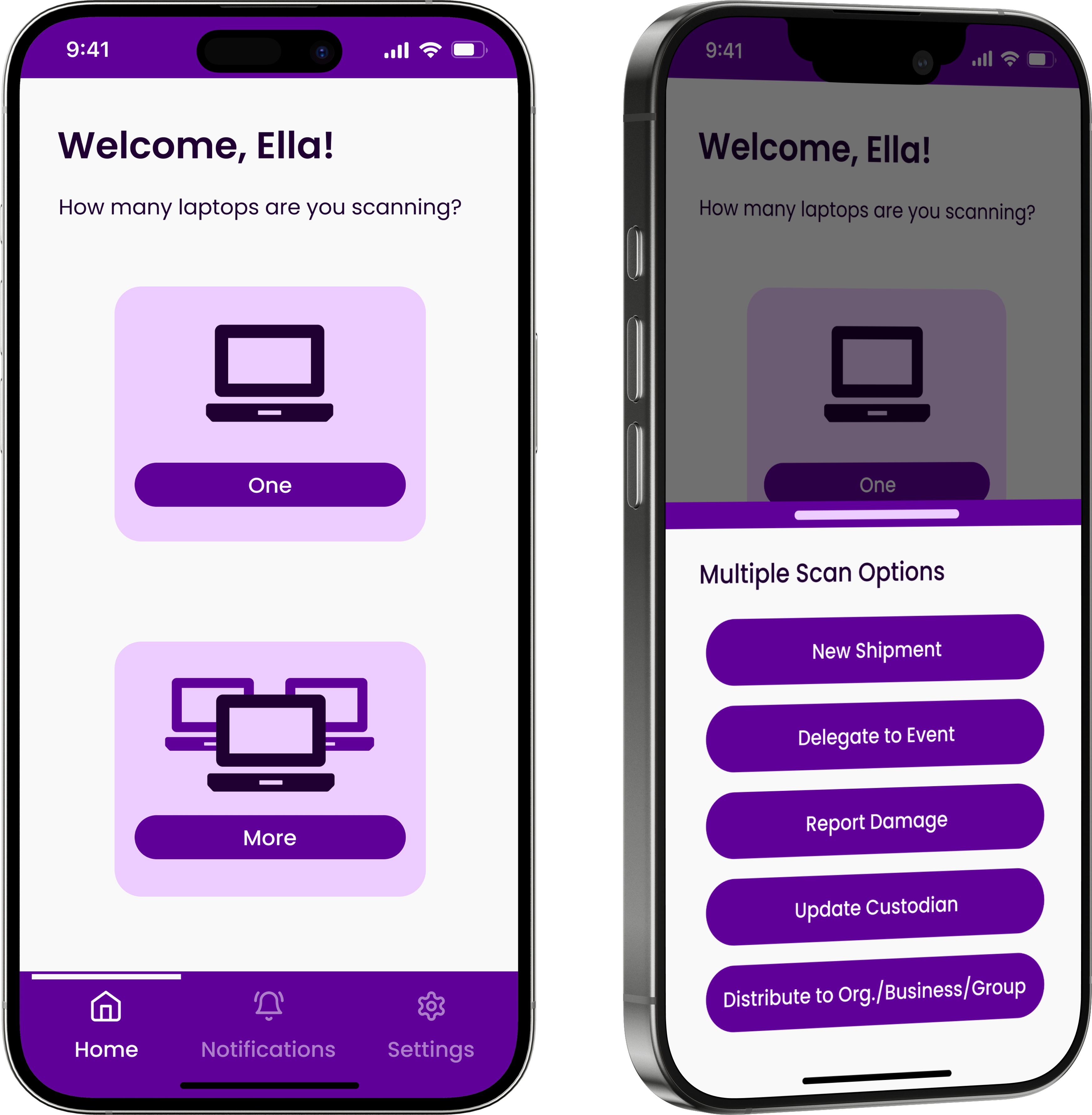
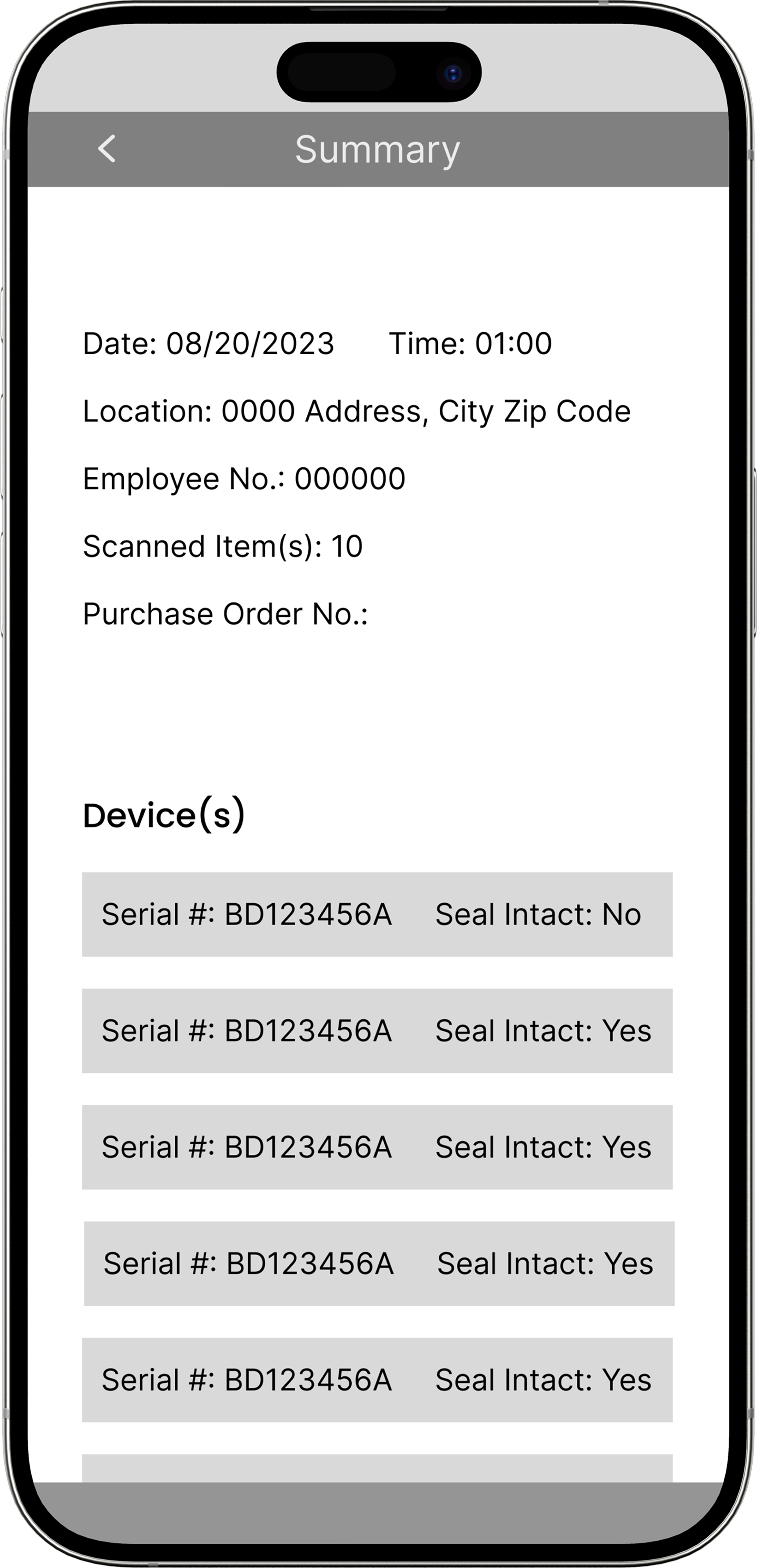
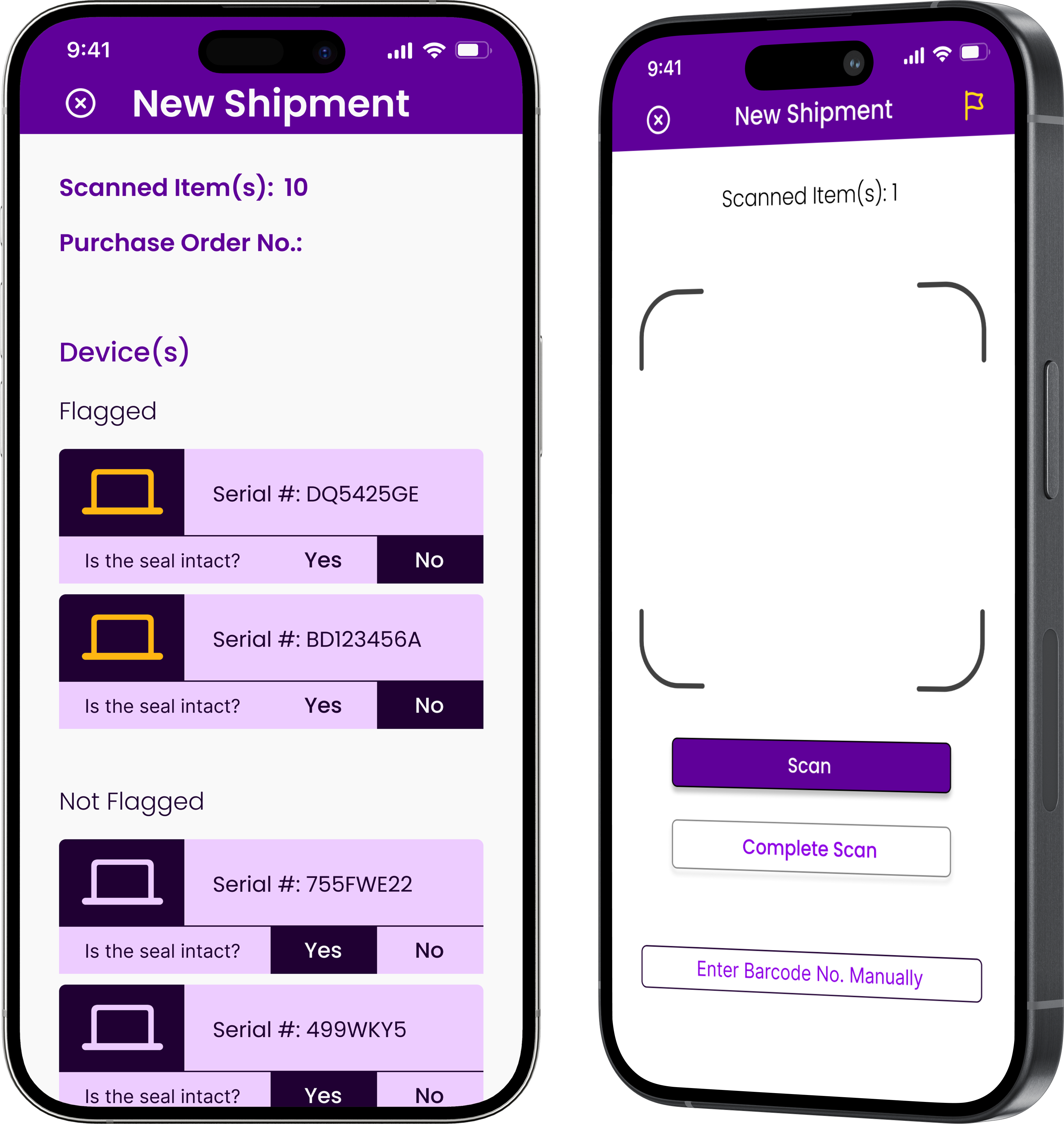
Once scope was locked, I assigned sections of the app across the team and personally owned the three highest-priority flows: the homepage, the scanning screen with flagging, and the summary page. I shared design direction with the engineering lead in parallel throughout, so by the time we handed off final designs, the backend was already ahead. That is a large part of why the project shipped on time.
Can someone pick this up and start scanning in under 10 seconds, without being told how?
With research complete and the brief stable, I structured early sessions around independent sketches before any group discussion, so the direction came from the full team rather than whoever spoke first.
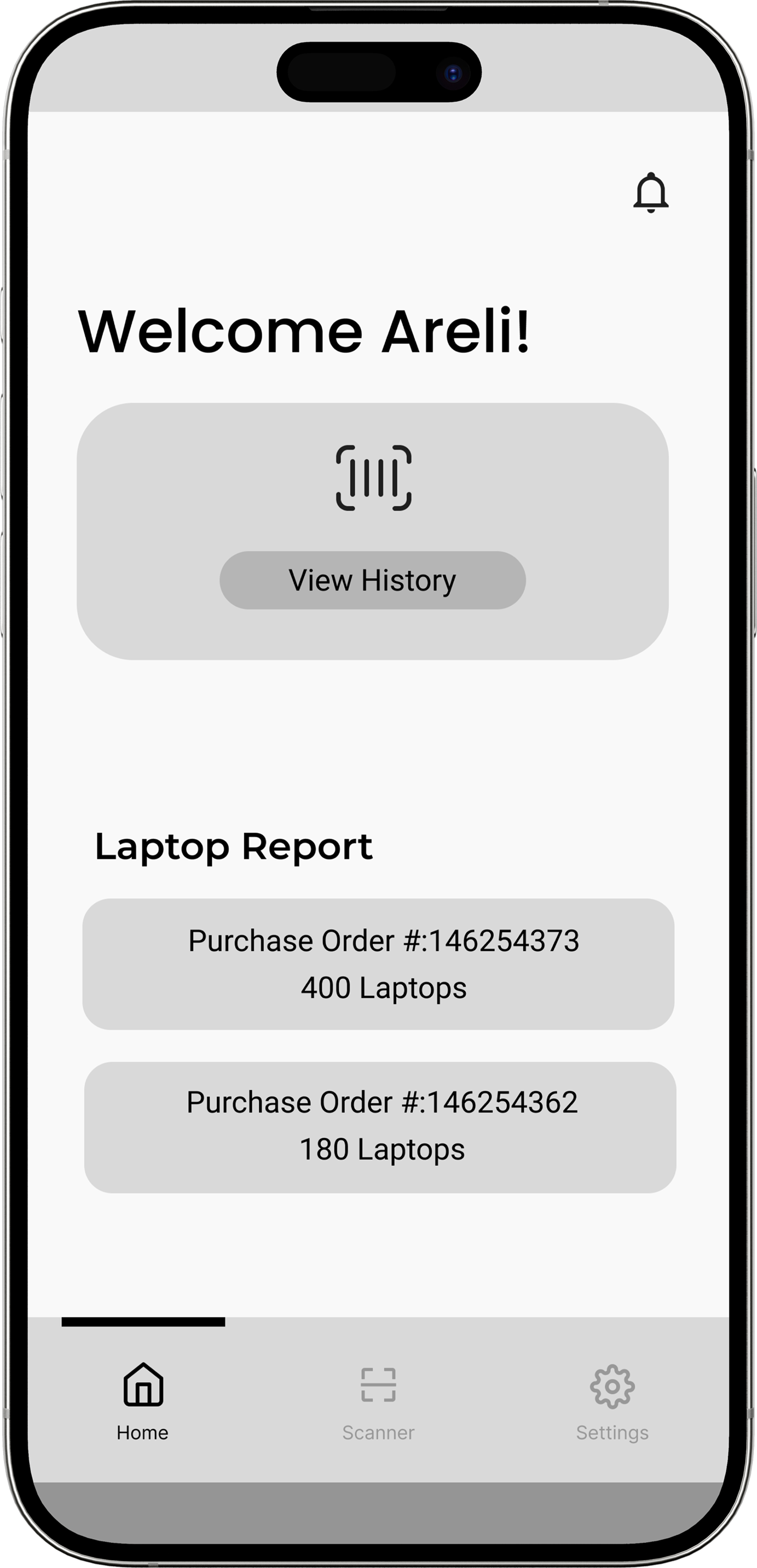
The initial instinct was to lead with visibility. Stakeholders kept repeating that they needed to see where devices had been and where they were going, so that framing stuck. The first homepage surfaced history and laptop reports front and center. Scanning, the primary action, was tucked behind a nav icon. Starting a shipment required 4 to 6 interactions.
Before moving to high-fidelity, I ran formal usability sessions to validate workflow assumptions, not just visual choices. Hour-long paired sessions with program administrators, managers, and warehouse workers who had not seen the app before.
Can someone pick this up and start scanning in under 10 seconds, without being told how?
Three decisions that changed how the tool and the system worked
Each decision was evaluated against the same question: can someone pick this up and start scanning immediately, without friction getting in the way? The options I didn't choose mattered as much as the ones I did.
From avoidance to proactive verification.
The app shipped in December 2024 and the operational change was immediate. Administrators could answer audit questions in seconds rather than hours. The tool also did something we hadn't planned for: it made the program easier to scale.
This is an internal tool. A live link is not available, but the product shipped and is actively in use by LA County.
An LA County manager put it best after seeing the tool: "Wow, this is amazing. I would like to see if we can adapt this for our asset tags."
— Manager, LA CountyStaff who had been avoiding inventory movement started proactively verifying devices before distribution events. That behavioral shift, from avoidance to ownership, was the outcome that mattered most.
Three things I'd carry into any complex workflow project.
Research reveals what briefs miss
The brief described a tracking problem. Research revealed it was physical as much as digital, and that the user range was far wider than anyone had documented. Both discoveries changed the direction entirely.
Test the primary action first
Stakeholder input shaped the first design before a single user validated the core task. 90% of participants could not find scanning. Starting with "can someone do the one thing this is for?" would have caught that earlier.
Name the scope problem early
Stakeholder misalignment cost weeks. The fix was naming it as a scope problem, not a design problem, and bringing the PM into that conversation with a clear proposal rather than waiting for consensus.